
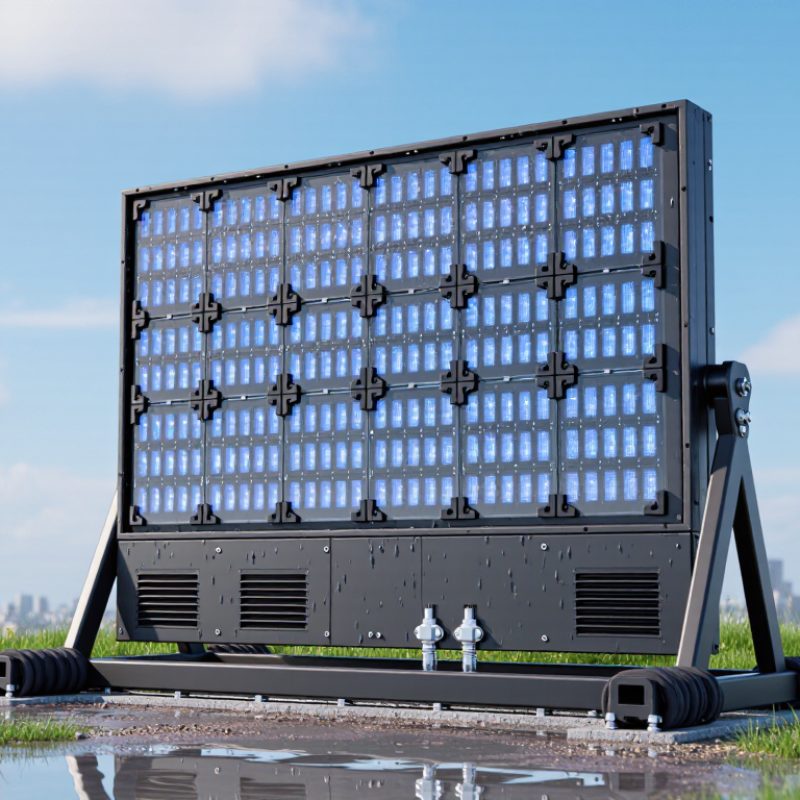
Choosing a waterproof outdoor LED screen is not simply a matter of selecting the brightest display. It requires a practical assessment of weather, viewing distance, installation height, and daily operating conditions. Rain may be obvious, but dust, humidity, salt air, sunlight, and rapid temperature changes can cause serious damage. A reliable waterproof outdoor LED screen should have a suitable IP rating, sealed cabinets, protected connectors, and a drainage-friendly structure.
Specifications deserve careful checking. An IP65 rating, for example, can indicate strong protection against dust and water jets, but it does not make every installation risk-free. No screen is immortal. Poor cable sealing, blocked ventilation, or careless maintenance can reduce its service life. Experienced installers also examine wind load, mounting strength, power stability, and access for repairs. These details often matter more than impressive brightness figures.
Independent test reports and clear warranty terms add confidence. However, buyers should question vague claims such as “fully waterproof” without documented testing or defined conditions. A screen beside a coastal road faces different risks from one installed beneath a covered stadium roof. This guide will explain how to compare protection levels, cabinet design, brightness, pixel pitch, control systems, and maintenance needs. It will also acknowledge a common mistake: choosing for the first installation day instead of the next five years. The best decision balances performance, safety, budget, and realistic local conditions.
How to Choose a Waterproof Outdoor LED Screen?
Define the Outdoor Environment and Waterproofing Requirements
Start with the site, not the screen. Map rainfall, humidity, dust, salt spray, sunlight, wind, and temperature swings. A coastal promenade needs stronger corrosion protection than a sheltered courtyard. An IP65 enclosure resists dust and water jets, but it is not designed for immersion. IP66 handles stronger water jets, while IP67 allows temporary immersion under defined test conditions. These ratings follow IEC 60529. They describe protection, not unlimited waterproofing.
Climate risk is becoming less predictable. The World Meteorological Organization’s State of the Global Climate 2023 report recorded 2023 as the warmest year, about 1.45°C above pre-industrial levels. That trend makes heat, sudden storms, and thermal expansion practical design concerns. Ask for the screen’s operating temperature range, humidity limits, and corrosion testing. Check both the front and rear ratings. The weakest connector can defeat a strong cabinet rating.
Field inspections often find water entering through cable glands, service doors, or poorly angled mounting frames. Seal those points carefully. Add a slight drainage slope. Avoid placing the display beneath roof runoff. I have seen installations over-specify the cabinet while ignoring cables. That is an expensive mistake. IP68 may sound safer, but it can increase cost, weight, and maintenance difficulty. Specify protection according to the actual environment, then verify test documents, installation details, and warranty conditions.
Define the outdoor environment and match the enclosure to the required water-exposure test.
The IP water-protection ratings shown above are based on IEC 60529 test levels: IPX4 protects against splashing water, IPX5 against water jets, IPX6 against powerful water jets, IPX7 against temporary immersion up to 1 metre for 30 minutes, and IPX8 against continuous immersion under conditions specified by the manufacturer. For an exposed outdoor LED screen, select the rating according to rain, cleaning methods, drainage, and flood risk, and verify the front and rear enclosure ratings separately.
A waterproof outdoor LED screen needs more than a high IP rating. The rating usually follows IEC 60529 standards and describes protection against dust and water. IP65 means dust-tight protection and resistance to water jets. IP66 offers stronger water-jet protection. IP67 allows temporary immersion, while IP68 depends on the manufacturer’s tested conditions. Do not treat these numbers as interchangeable.
Check both sides of the cabinet. An outdoor screen may have an IP65 front but a lower-rated rear. That difference matters during heavy rain, washing, or wind-driven moisture. I have seen moisture enter through cable glands, loose doors, and poorly sealed service panels. Small installation mistakes can defeat a strong enclosure.
Weather resistance also includes ultraviolet exposure, temperature changes, drainage, and corrosion control. Dark cabinets can become extremely hot under direct sunlight. Effective ventilation or thermal management protects LEDs and power components. Coastal sites need corrosion-resistant materials and regular inspections. Ask for test reports, operating temperature ranges, and details about water testing. Look for a design that lets trapped water escape.
Higher protection is not always better. A fully sealed cabinet may reduce airflow and complicate repairs. That trade-off deserves careful thought. Before purchasing, inspect the mounting position, local rainfall, wind exposure, and maintenance access. A screen that survives a laboratory spray test may still struggle after months of dust, heat, and careless servicing.
Choosing a waterproof outdoor LED screen starts with sunlight, not the enclosure. The U.S. Department of Energy’s 2023 Solid-State Lighting R&D Opportunities report notes that commercial LED products can exceed 150 lumens per watt. However, a display’s optical efficiency is lower. For bright, open locations, specify about 5,000–8,000 nits. Direct coastal sunlight may require 10,000 nits. More brightness is not always better. Excess output can cause glare, higher power use, and faster thermal aging.
Viewing distance determines pixel pitch. A practical estimate is minimum viewing distance in meters equal to pixel pitch in millimeters. A 6 mm pitch screen may look acceptable from six meters, but fine text still needs greater distance. For a bus stop, test the smallest text at eye level. For a stadium, motion smoothness matters more than close-up detail. Many buyers overvalue resolution. I have made that mistake.
Display performance also depends on refresh rate, grayscale, contrast, and thermal control. A refresh rate above 3,840 Hz can reduce camera banding during event recording, although results depend on camera settings. The IEC 60529 standard defines IP65 protection against dust and water jets, but it does not guarantee corrosion resistance. Check cabinet seals, drainage, and operating temperature separately. The DOE report also warns that efficiency gains can be lost through poor system design. That warning deserves attention. A bright screen with weak ventilation may perform well for one summer, then disappoint.
| Evaluation Dimension | Recommended Outdoor Benchmark | How to Evaluate | Why It Matters |
|---|---|---|---|
| Brightness | 5,000–8,000 nits for direct sunlight; 2,500–5,000 nits for shaded locations | Compare the measured brightness with the installation environment. Confirm that brightness can be adjusted automatically or manually. | Insufficient brightness causes images to look washed out or unreadable in daylight. Excessive brightness can increase power consumption and glare. |
| Viewing Distance | Approximate minimum viewing distance: pixel pitch in millimetres × 1 metre | For example, a 5 mm pixel pitch is generally suitable from about 5 metres, while a 10 mm pitch is more appropriate for viewing from about 10 metres or farther. | The correct viewing distance helps balance image sharpness, installation cost, and screen size. |
| Pixel Pitch | 3.9–5.9 mm for relatively close viewing; 6–10 mm for medium or long-distance viewing | Choose a smaller pitch when viewers will stand closer or when text and detailed graphics are important. Choose a larger pitch for highways, stadiums, and distant viewing. | Smaller pixel pitch provides higher image detail but usually increases LED quantity, cost, and power requirements. |
| Waterproof Protection | At least IP65 on the front; IP54 or higher on the rear, depending on the cabinet design | Check the complete assembled cabinet rating, not only the LED module rating. Confirm protection against rain, dust, drainage issues, and cable-entry points. | Outdoor screens are exposed to rain, dust, humidity, and wind-driven water. Protection should match the installation direction and local weather conditions. |
| Refresh Rate | At least 1,920 Hz for normal digital signage; 3,840 Hz or higher for camera-recorded content | Review the refresh-rate specification together with the control system and receiving cards. Test the screen with a camera when live streaming or filming is required. | A higher refresh rate reduces visible scanning lines, flicker, and rolling bands in photographs and video recordings. |
| Contrast Ratio | About 3,000:1 or higher for outdoor applications | Ask for test conditions and verify performance in both bright daylight and low-light conditions. Consider black-level performance, not only the stated ratio. | Good contrast improves readability, depth, and color separation when ambient light changes. |
| Color and Grayscale Performance | 16-bit or higher internal processing is commonly preferred; consistent RGB calibration is essential | Inspect skin tones, gradients, dark scenes, and large solid-color areas. Check whether brightness and color calibration are consistent across cabinets. | Accurate grayscale and color uniformity prevent banding, color patches, and visible differences between modules. |
| Viewing Angle | Typically about 120° horizontal and 120° vertical, depending on LED and mask design | View the screen from the sides and below the normal sightline. Confirm that brightness and color remain acceptable across the expected audience area. | A wide viewing angle allows more people to see consistent content without severe brightness or color shifts. |
| Operating Temperature | Common outdoor ranges are approximately −20°C to +50°C; verify the actual specification for the site | Match the rated range to local summer and winter conditions. Check whether the cabinet includes ventilation, fans, heating, or temperature monitoring. | Temperature protection helps reduce failures caused by overheating, condensation, freezing, and thermal cycling. |
| Power Consumption | Typical average consumption: approximately 300–800 W/m²; peak consumption can be higher | Use the maximum rated power for electrical planning and the average power figure for energy-cost estimates. Include brightness settings and operating schedules. | Power demand affects circuit sizing, operating cost, heat generation, and the capacity of backup power systems. |
| Cabinet and Structural Design | Corrosion-resistant cabinet materials, sealed connectors, drainage paths, and wind-load calculations | Review cabinet weight, service access, mounting method, drainage, grounding, and the structural design for the local wind zone. | A weather-resistant LED module alone does not ensure a safe installation. The entire cabinet and supporting structure must withstand outdoor conditions. |
| Maintenance Method | Front service for restricted-access locations; rear service where there is sufficient maintenance space | Confirm module access, spare-part availability, cabinet replacement time, and whether power supplies and receiving cards can be serviced independently. | Convenient maintenance reduces downtime and lowers service costs over the screen’s operating life. |
Note: Actual performance varies by LED package, cabinet construction, control system, installation environment, and operating settings. Always verify test conditions and site-specific requirements before final selection.
When choosing an outdoor LED screen, inspect the installation plan before comparing brightness. IEC 60529 defines IP ratings for dust and water protection. IP65 resists dust and water jets, but it does not allow immersion. That difference matters during heavy rain, cleaning, or poor drainage. Check cabinet seals, cable glands, rear ventilation, grounding, and surge protection. A screen mounted beside a roof edge may face stronger water impact than its rating suggests. Installation height also affects maintenance safety. An accessible screen usually costs less to service over time.
Maintenance should be planned, not improvised after the first failure. Inspect seals, fans, filters, connectors, and drainage channels at scheduled intervals. Salt air, dust, and heat can quietly damage modules. The U.S. Department of Energy’s Solid-State Lighting Technology Fact Sheet reports that LEDs can use at least 75% less energy and last up to 25 times longer than incandescent lighting. This does not guarantee a screen’s service life. Thermal stress, power quality, and poor repairs still shorten performance. In field inspections, one blocked vent can create uneven brightness. I would not ignore small faults.
Tips: Request an IP test certificate, salt-spray evidence, thermal data, and a written maintenance schedule. Confirm replacement access before installation. Ask how brightness is calibrated after module changes. Keep spare modules in dry, temperature-stable storage. Check them regularly.
Choosing a waterproof outdoor LED screen starts with the application, not the lowest quotation. A roadside billboard needs high brightness, wide viewing angles, and strong wind resistance. A stadium display may need fast refresh rates for clear video. A shop entrance usually needs less brightness and a smaller pixel pitch. Match the screen to its viewing distance. A screen viewed from 30 meters does not need the same resolution as one viewed from five meters.
Budget includes more than the panel price. Check the control system, steel structure, cabling, installation, transport, and future maintenance. An IP65 rating can protect the front from rain and dust, but the installation still needs proper drainage. Ask for test reports, operating temperature ranges, brightness data, and warranty terms. These details help separate a reliable system from an attractive quote.
Do not overspend blindly. A screen with extreme brightness may waste energy in a shaded area. A cheaper model may require frequent module replacement. That mistake becomes expensive. Consider front or rear maintenance access before choosing the cabinet design. Technicians need space to work safely, especially above busy walkways. In practice, application conditions often change after installation. Leave some budget for spare modules and unexpected structural adjustments. A careful site survey may feel slow, but it can prevent costly corrections.